
572 字
3 分钟
处理文件流
如果在项目中第一次遇到下载、导出文件的时候,我们都会直接去请求API,期望会下载一个文件到本地,然后我们可以打开它。但是看到的结果却出乎意料。
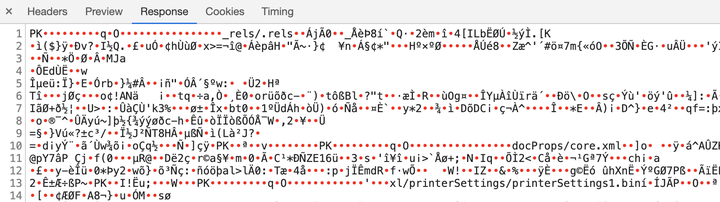
并没有出现期望的情形,而是返回了一堆“乱码”。
AJAX无法下载文件的原因
下载其实是浏览器的内置事件,浏览器的 GET请求(frame、a)、 POST请求(form)具有如下特点:
- response会交由浏览器处理
- response内容可以为二进制文件、字符串等
但是AJAX请求不一样:
- response会交由 Javascript 处理
- response内容只能接收字符串才能继续处理
因此,AJAX本身无法触发浏览器的下载功能。
Axios如何实现下载
- 发送请求
- 获得response
- 通过response判断返回是否为流文件
- 如果是文件则在页面中插入frame/a标签
- 利用frame/a标签实现浏览器的get下载
首先封装一个download方法,用于发送请求
import Axios form 'axios';
/* * @params {string} url 请求地址 * @params {object} resOpts 请求配置参数 */const download = (url, resOpts = {}) => { const { type = 'get', data = '' } = resOpts const queryArgs = { url, method: type, data, headers: { Accept: 'application/json', 'Content-Type': 'application/json; charset=utf-8', withCredentials: true, }, } // tips: 这里直接返回的是response整体! return Axios.request(queryArgs).catch(err => console.log(err))}
...拿到response之后我们需要将流文件通过浏览器下载
export function convertRes2Blob(response) { // 提取文件名 const fileName = response.headers['content-disposition'].match( /filename=(.*)/ )[1] // 将二进制流转为blob const blob = new Blob([response.data], { type: 'application/octet-stream' }) if (typeof window.navigator.msSaveBlob !== 'undefined') { // 兼容IE,window.navigator.msSaveBlob:以本地方式保存文件 window.navigator.msSaveBlob(blob, decodeURI(filename)) } else { // 创建新的URL并指向File对象或者Blob对象的地址 const blobURL = window.URL.createObjectURL(blob) // 创建a标签,用于跳转至下载链接 const tempLink = document.createElement('a') tempLink.style.display = 'none' tempLink.href = blobURL tempLink.setAttribute('download', decodeURI(filename)) // 兼容:某些浏览器不支持HTML5的download属性 if (typeof tempLink.download === 'undefined') { tempLink.setAttribute('target', '_blank') } // 挂载a标签 document.body.appendChild(tempLink) tempLink.click() document.body.removeChild(tempLink) // 释放blob URL地址 window.URL.revokeObjectURL(blobURL) }}缺点
- download请求方法与convertRes2Blob处理文件下载的方法,需要分开调用
- download使用独立的实例,不能公用一个axios,基础配置需要单独维护